Page 1 of 1
Customisation of search bar booking page
Posted: Sat Jan 28, 2023 1:50 pm
by songesand camp
Hello

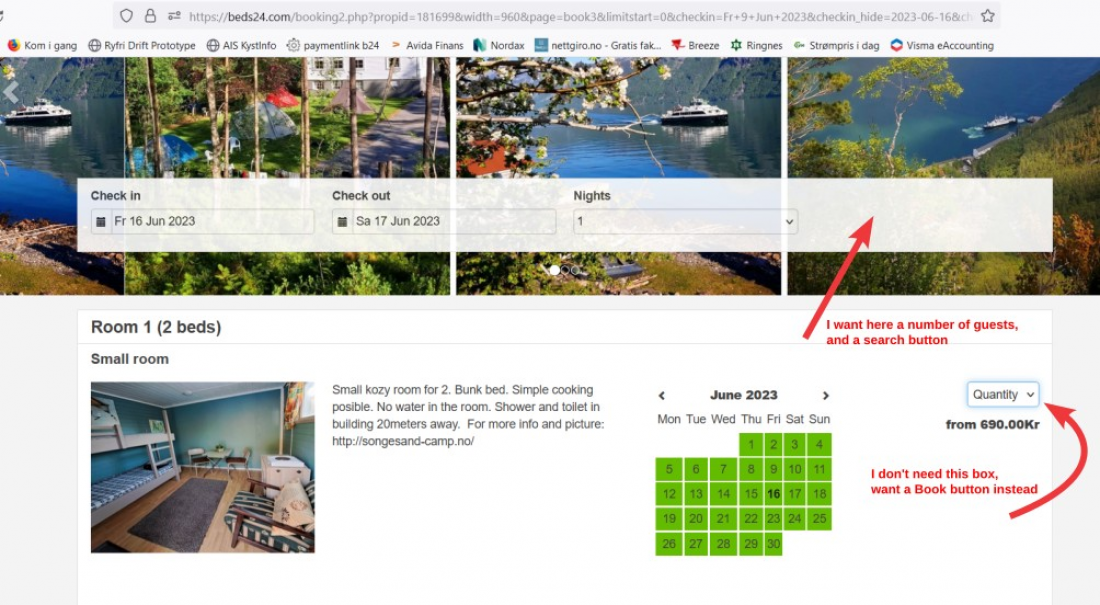
I would like to alter the search bar and make it look much the way it does here:
https://media.xmlcal.com/pic/p0018/1699/23.png
In my case with a slider for choosing number of guests and a search button. This picture shows what I would like:
https://media.xmlcal.com/pic/p0018/1699/23.png
How to go about this?
Thank you,
Hessel
Re: Customisation of search bar booking page
Posted: Mon Jan 30, 2023 1:15 pm
by lesleywoermeijer
You can do this when you go to Settings > Booking Engine > Property Booking Page > Multiple Room Bookings = 'Guest can choose' OR 'Enable'
Re: Customisation of search bar booking page
Posted: Tue Jan 31, 2023 8:57 am
by songesand camp
Charming, thank you Lesley!

Re: Customisation of search bar booking page
Posted: Sat Feb 24, 2024 3:12 am
by the ranch at walston springs
I would like to have a search next to dates too, but am still not sure how to do this. Could someone please advise? Thank you@
Re: Customisation of search bar booking page
Posted: Mon Feb 26, 2024 8:03 am
by annettemorgenroth
Can you share a link and explain what exactly you would like to change?
Re: Customisation of search bar booking page
Posted: Tue Feb 27, 2024 12:52 am
by the ranch at walston springs
Here is a link for what our booking page currently looks like
[
https://theranchatwalstonsprings.com/bookings/]
I would like to have a "search" button next to the check in check out dates at the top
Then when the guest scrolls down they will see what rooms are available for their dates and instead of the quantity button I would like the book now button there
Re: Customisation of search bar booking page
Posted: Tue Feb 27, 2024 8:05 am
by annettemorgenroth
There is no provision for this because the search is performed automatically whenever someone enters something in the search bar.
Re: Customisation of search bar booking page
Posted: Wed Feb 28, 2024 8:47 am
by lesleywoermeijer
The Quantity selector is shown when you have activated 'Multiple room booking' in Settings > Booking Engine > Property Booking Page. If you set this = Disable or Guest can choose, then the guest can/will see the Book Button.